
What is it?
Ever wondered where a lead came from? Our Gravity Forms referral tracking WordPress plugin is a referral url and utm tracking plugin that stores the referral url, labelled source, utms, and click id values of the user prior to form submission, so you can see where your entries are coming from!
With this plugin you’ll see exactly which search engine, social network, AI assistant, email platform, or ad campaign (any referral url) generated each lead in your Gravity Forms Entries view, a scheduled email digest or the submission itself.
How Does it Work?
Using first-touch attribution, we store the original referrer and campaign data on every Gravity Forms entry–so even if someone submits days after their initial visit, you still see the source that originally brought them in. (The attribution window is 7 days by default, and you can change it.) Want to credit the most recent source instead? Turn on last-touch attribution and we’ll capture that too, right alongside first-touch.
We also auto-label common sources (Google Ads vs Organic, Facebook, LinkedIn, TikTok, Bing, and more) and save full UTM + click ID details for clean, reliable reporting. You can also add custom labels to any source url you’d like to appear clean.
Everything is saved directly on the entry. No need to platform-hop just to see where a lead came from!
Features
- Know exactly where each lead came from
See the source right inside each Gravity Forms entry–search, social, AI assistants, email, or paid campaigns. - Captures UTMs + click IDs
Stores UTM parameters and common click IDs (likegclid,msclkid,gbraid,wbraid, and more) for accurate attribution. View the full list - First- and last-touch attribution
Saves the original referrer and campaign values so later submissions still credit the right source. Optionally enable last-touch to also capture the most recent source before submission–and flip every Reports chart between First and Last with a single toggle. - Adds tracking fields automatically
No rebuilding forms. Tracking fields are added and populated behind the scenes. - Add custom sources
You can add your own labelled sources. Helpful if there’s websites that bring you leads and you want a clear label vs just the URL referrer. - Built-in Reports dashboard
View attribution at a glance with charts for source breakdown, submissions over time, and top UTM source, medium, campaign, and referrers. Filter by form and date range, compare to the previous period, and hide unattributed traffic. - Scheduled email digest
Get a weekly or monthly email with top sources, top campaigns, and (optionally) the percent change vs. the prior period – delivered to one or more recipients in your site’s timezone. New in 1.4.0. - Merge tags for CRM routing & notifications
Drop{pb_ref_source},{pb_ref_utm_source},{pb_ref_clid}, and more into notifications, confirmations, webhooks, and feeds–no hunting for field IDs. View the full list - Mirror fields for CRM field mapping Some CRM, email, and webhook add-ons only map from a form’s saved field list. One click adds editor-visible mirror fields so your tracking data shows up in their dropdowns–no custom-value mapping required.
- Clear labels + privacy-safe by design
Data stays in your WordPress database as part of the entry. The plugin never sends conversion events to ad platforms on its own – you decide whether to forward the captured values to your own analytics. - Pass Referral Data to Google Analytics
Forward the captured source, campaign, and click IDs to your own GA4 or Google Tag Manager setup using merge tags in a redirect confirmation. The plugin supplies the values; your existing tags do the sending. - WordPress Multisite compatible
Network-activate once and start tracking across subsites. (Network Mode available on Unlimited plans.) - Translation-ready + includes 16 languages
Ships with bundled translations and works great on multilingual sites. View the full list.
Watch The Demo
Screenshots
Documentation
How do I enable the plugin?
After purchasing Referral Source Tracking for Gravity Forms, you’ll need to install the plugin on your WordPress website. Let’s walk through that process.
Step 1: Installation
Log in to your WordPress website and navigate to Plugins → Add Plugin → Upload Plugin → Install the zip file and activate it.
Step 2: Register the Plugin
On the left hand navigation, navigate to the Gravity Forms settings → Referral Source Tracking.
Enter your license key and activate it.
Step 3: Enable the Feature
After activating your license, a “General” tab will appear in the Referral Source Tracking settings page, click it and click “Save Changes”
That’s it! Now referral source tracking will be active on any existing forms or new forms you create.
Feature Details
Sources it Detects
We capture the referrer URL when one is available and store it on the entry. We also apply friendly labels for common platforms so the source is easy to understand at a glance.
Here’s the list of sources that are labeled when detected:
- Google: Google Ads, Google Organic, Gemini
- Microsoft/Bing: Microsoft Ads, Bing Organic
- Facebook: Facebook Ads, Facebook Organic
- LinkedIn: LinkedIn Ads, LinkedIn Organic
- X (Twitter): X Ads, X Organic
- Reddit: Reddit Ads, Reddit Organic
- TikTok: TikTok Ads, TikTok Organic
- Pinterest: Pinterest Ads, Pinterest Organic
- Snapchat: Snapchat Ads, Snapchat Organic
- Other Search Engines: Yahoo, DuckDuckGo, Yandex
- AI Assistants (when available): ChatGPT, Perplexity, Microsoft Copilot, Claude, Grok, DeepSeek
- Email Platforms (campaign tracking): Mailchimp, Constant Contact, Salesforce Pardot, HubSpot
- Direct and Unknown are used when appropriate.
- Custom sources can be defined under Custom Sources for partner, affiliate, and campaign traffic.
UTM Parameters it Captures
utm_sourceutm_mediumutm_campaignutm_termutm_contentutm_id
Click IDs Captured
gclidgbraidwbraidmsclkidli_fat_idrdt_cidttclidpin_cidsnap_cidmc_cidmc_eiddclidfbclid
Custom Sources
Built-in source detection covers the major search engines, social platforms, AI assistants, and email marketing tools out of the box. Custom Sources let you add your own labelled rules on top – for partner sites, affiliate referrals, named campaigns, branded shorteners, employee links, and anything else where the default “Referral” label or a raw utm_source value isn’t specific enough.
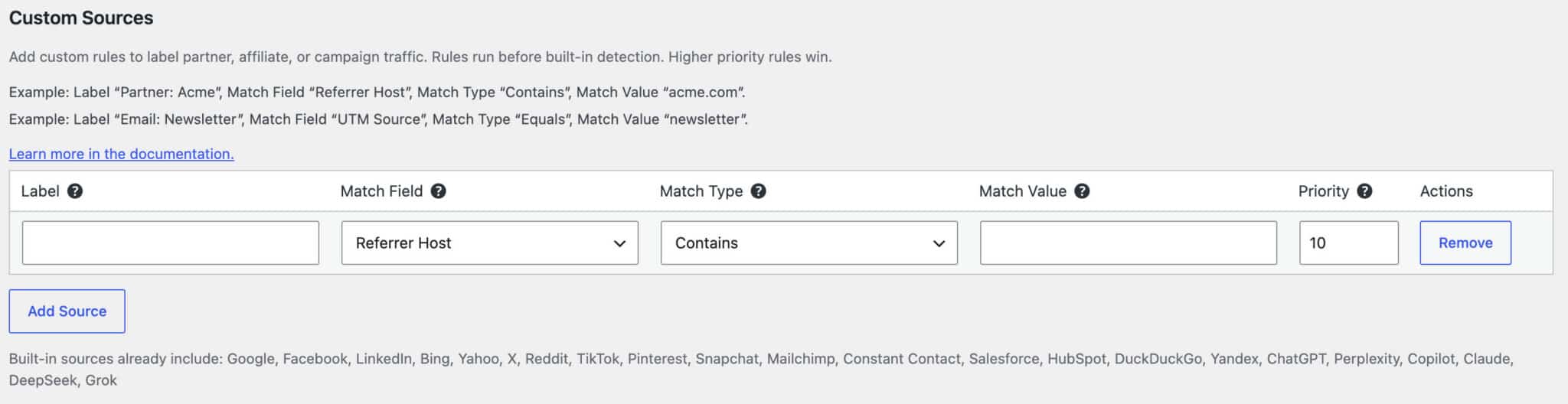
Find them under Forms → Settings → Referral Tracking in the Custom Sources section. Each row is one rule.
How a rule is evaluated
For every visit, the plugin checks your Custom Sources before built-in detection. The first rule that matches wins, the visitor’s source is set to that rule’s Label, and built-in detection is skipped for that visit. If nothing matches, built-in detection runs as usual (Google, Facebook, Direct, etc.).
The fields, one by one
- Label – The text saved as the visit’s Source (e.g.
Partner: Acme,Email: Newsletter,Campaign: Spring Sale). This is exactly what shows up in the entry, in the{pb_ref_source}merge tag, in the Reports tab, and in any CRM mapping. Pick something you’ll recognise on a busy entries screen. - Match Field – Where to look:
- Referrer Host – the domain in the browser’s referrer (e.g. matches
acme.comwhen someone arrives fromhttps://www.acme.com/blog/post). - UTM Source / Medium / Campaign / Term / Content – the corresponding
?utm_*=parameter on the landing URL. - Match Type –
- Contains – the field value includes your Match Value anywhere inside it. Case-insensitive. Good for catching variations like
acme.com,blog.acme.com,partner.acme.comwith one rule. - Equals – the field value is exactly your Match Value (case-insensitive). Stricter – use when you need a precise match like
utm_sourceexactly equalsnewsletter. - Match Value – The text to look for. No quotes, no asterisks, just the literal string.
- Priority – A number controlling order. Higher runs first. If you have overlapping rules, the higher-priority one wins. Default is
10; bump to20or50for rules that must beat your defaults, drop to5for catch-alls.
Worked examples
Label a partner site by referrer
| Label | Match Field | Match Type | Match Value | Priority |
|---|---|---|---|---|
Partner: Acme | Referrer Host | Contains | acme.com | 20 |
Anyone arriving from any subdomain of acme.com is labelled Partner: Acme instead of the generic Referral.
Label a tagged newsletter campaign
| Label | Match Field | Match Type | Match Value | Priority |
|---|---|---|---|---|
Email: Newsletter | UTM Source | Equals | newsletter | 20 |
Use this when you control the URL on your end (e.g. links inside your weekly email send ?utm_source=newsletter).
Label a paid campaign by its UTM campaign name
| Label | Match Field | Match Type | Match Value | Priority |
|---|---|---|---|---|
Campaign: Spring Sale | UTM Campaign | Contains | spring-sale | 15 |
Catches ?utm_campaign=spring-sale-2026, ?utm_campaign=spring-sale-google-ads, and similar variants in one rule.
Override built-in Google detection for a specific affiliate
| Label | Match Field | Match Type | Match Value | Priority |
|---|---|---|---|---|
Affiliate: Acme via Google Ads | UTM Source | Equals | acme-gads | 50 |
A high priority makes sure this rule wins over the built-in utm_source=google → Google Ads labelling whenever the tagged source comes through.
“Append Organic/Ads Labels” with custom sources
Built-in sources always show as Google Ads, Facebook Organic, etc. The Append Organic/Ads Labels (Custom Sources) checkbox (also under Forms → Settings → Referral Tracking) controls whether your custom labels get that same suffix.
- Checked (default) – a custom rule labelled
Partner: AcmebecomesPartner: Acme Organicon referral traffic andPartner: Acme Adsif the visit also carries a paid medium (utm_medium=cpc) or click ID. - Unchecked – your custom labels render exactly as you typed them, no suffix appended.
Pick whichever fits your reporting – most teams want the suffix so they can compare paid vs organic partner traffic, but if you’re using the Label itself to carry the full identity, turn it off.
Adding rules programmatically
If you’re building an add-on or want rules under version control, the pb_gforms_referral_tracking_custom_sources filter accepts the same shape as the admin UI and merges with it. Rules from both sources are sorted together by priority before the front-end evaluates them.
Mirror Fields
Our tracking fields are added to your form dynamically at render time–they aren’t part of the form’s saved field list. That keeps your forms clean, but some CRM, email marketing, and webhook add-ons build their field-mapping dropdowns only from saved fields, so they can’t “see” our dynamic fields.
Mirror fields fix that. Under Forms → Settings → Form Options, click Add mirror fields and the plugin adds a parallel set of editor-visible Hidden fields to your form. The original tracking fields stay the source of truth; their captured values are copied into the mirror fields automatically when the entry is created, so your add-on can map them from its normal field dropdown.
If your add-on supports a “Custom Value” mapping option, you don’t need mirror fields at all–just map our merge tags directly (for example {pb_ref_source}, {pb_ref_utm_source}, {pb_ref_clid}).
Managing mirror fields:
- Add mirror fields – creates the editor-visible set.
- Add missing mirror fields – restores only manually deleted ones and leaves surviving field IDs untouched, so saved mappings keep working.
- Remove duplicate mirror fields – cleans up accidental editor duplicates in one click.
- Remove mirror fields – deletes the set (with a confirmation). Values already saved to past entries stay in the database, but add-ons will no longer see them via field-ID lookups.
When last-touch attribution is enabled, mirror fields can include the last-touch set too, so those values are mappable the same way.
Reports
Find Reports under Forms → Settings → Referral Tracking → Reports. The tab visualises every entry that landed during the date range you pick, broken down by source, UTM dimension, and referrer.
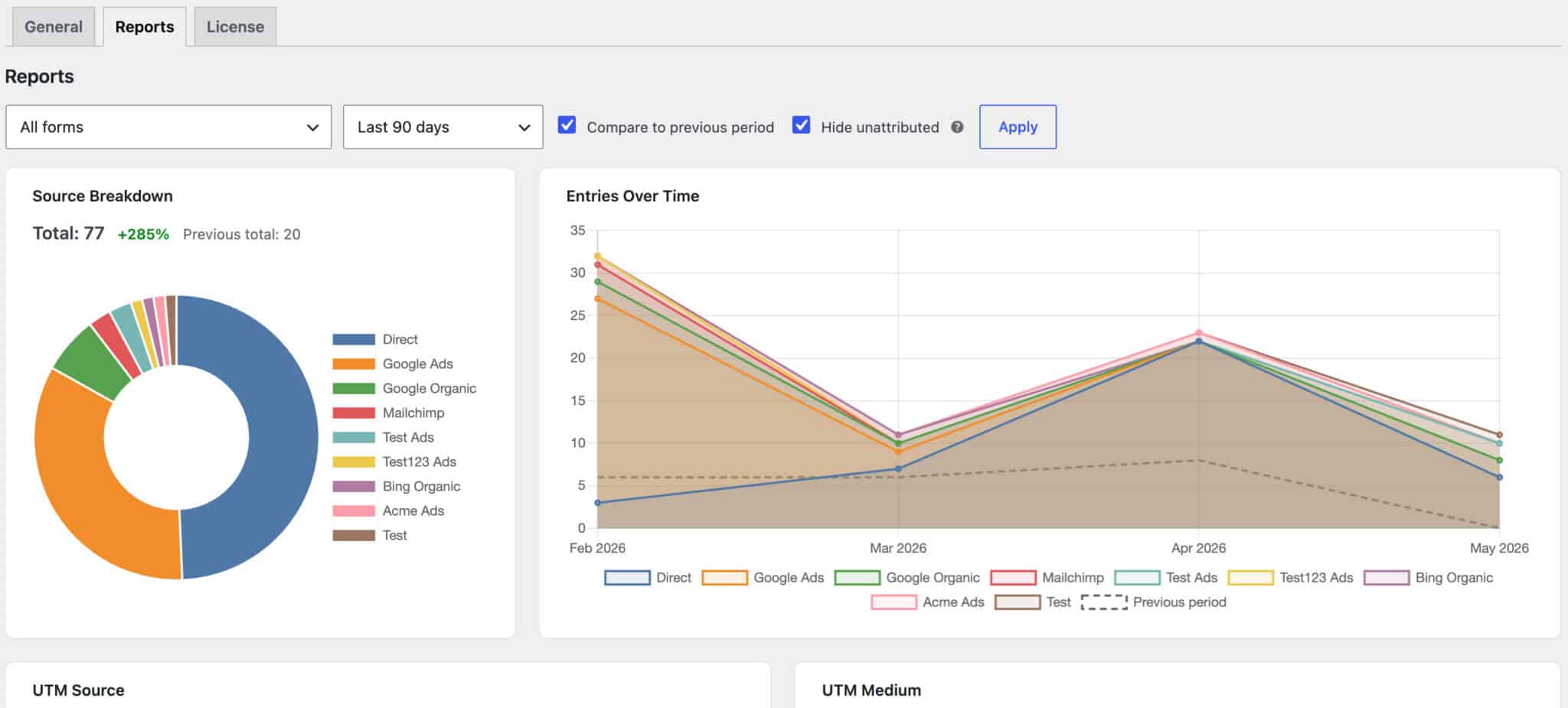
Charts at a glance
- Source Breakdown – donut chart showing the share of submissions per labelled source (Google Organic, Facebook Ads, your Custom Sources, Direct, etc.).
- Submissions Over Time – stacked line chart showing daily counts per source so you can spot trends and campaign spikes. Longer windows (90 and 365 days) bucket by month and thin out the tick labels so the axis stays readable.
- Top UTM Source / Medium / Campaign – horizontal bar charts of the highest-performing values in each UTM dimension.
- Top Referrers – horizontal bar chart of the referring domains driving the most submissions (excludes Direct, since Direct has no referrer).
Filters
- Form – scope to a single form, or leave on “All forms” for a site-wide view.
- Date range – preset windows (Today, Yesterday, Last 7 / 30 / 90 / 365 days) plus a custom range picker.
- Compare to previous period – when on, every chart and total shows the percent change vs. the equivalent prior window (last-7 vs. the prior 7, last-30 vs. the prior 30, etc.).
- Hide unattributed – hides the Direct, Not Set, and Unknown buckets so you can focus on attributed sources only.
Your selected date range, compare-period, and hide-unattributed choices are remembered per-user across visits – you don’t have to reset them every time you open the tab.
Performance and caching
Reports are computed from your Gravity Forms entries and cached for fast repeat loads. The cache is invalidated automatically when new entries come in, debounced behind a 60-second lock so high-volume forms don’t thrash it. Developers can tune the debounce window (or disable it entirely) with the pb_gforms_rt_invalidate_debounce filter – see Hooks below.
Email Digest
If you’d rather get attribution highlights delivered than open the dashboard, enable the email digest under Forms → Settings → Referral Tracking → Email Reports.
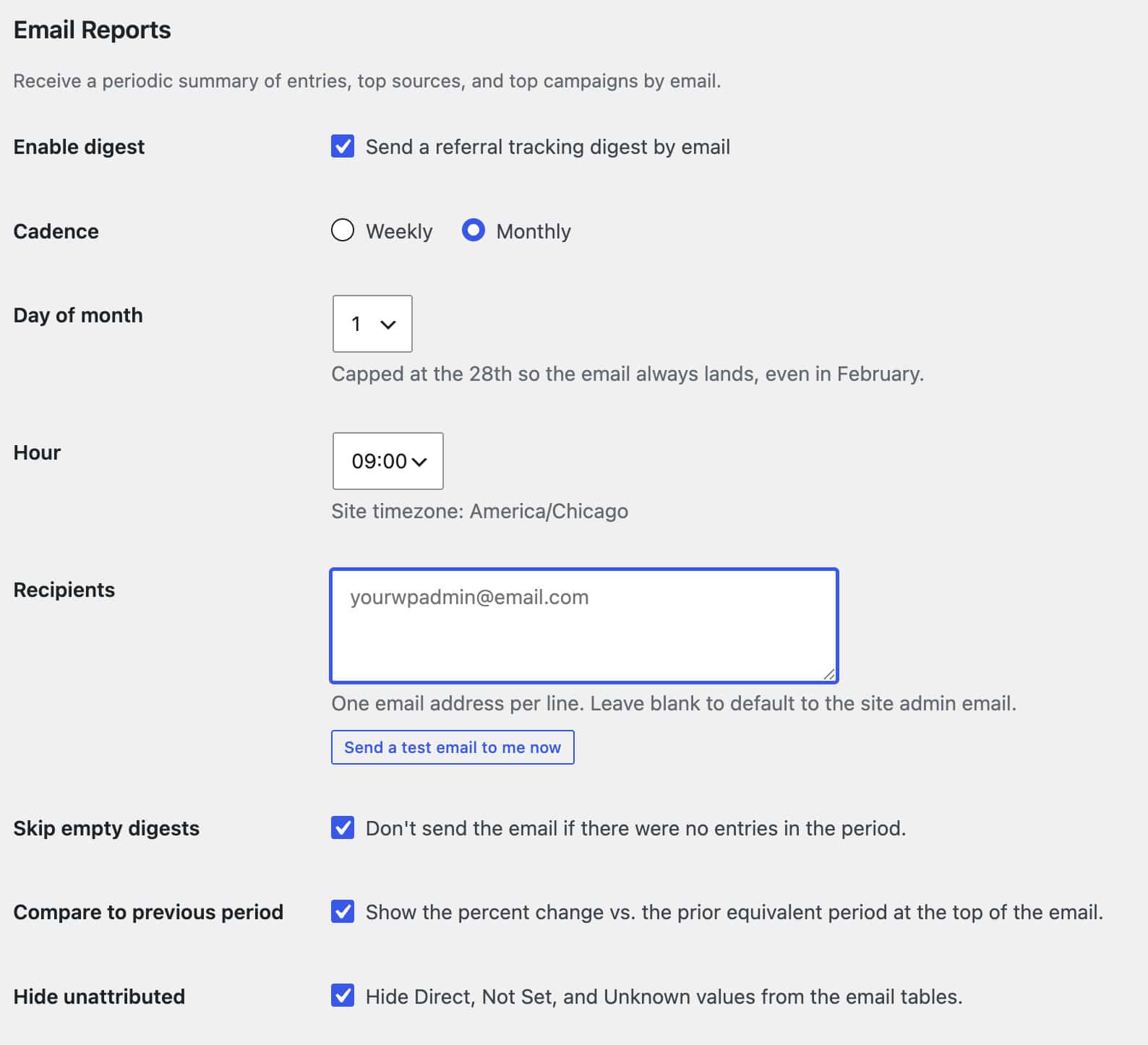
Cadence and timing
- Weekly – pick the day of the week (Sunday through Saturday) and the hour the email sends.
- Monthly – pick the day of the month (capped at the 28th so the email always lands, even in February) and the hour.
- All times are evaluated in your site’s timezone (WordPress → Settings → General). The current timezone is shown right next to the Hour selector so there’s no guessing.
Recipients
One email address per line. Leave the field blank to fall back to the site admin email at send time – useful if the admin email might change later and you want the digest to follow it automatically.
The Send a test email to me now button delivers the same digest using your saved settings, so you can preview exactly what subscribers will receive. The button auto-disables while there are unsaved changes; save first, then test.
Content options
- Skip empty digests – don’t send the email at all if zero entries landed during the period. Useful for sparse forms that would otherwise generate empty noise on quiet weeks.
- Compare to previous period – show the percent change vs. the prior equivalent window at the top of the email (last week vs. the week before, last month vs. the month before, etc.).
- Hide unattributed – omit Direct, Not Set, and Unknown values from the email tables so the focus stays on attributed sources.
Merge Tags
{pb_ref_source} – value stored in the hidden “Source” field (defaulting to “Unknown” when the visit couldn’t be classified).
{pb_ref_params} – full string of captured referral parameters (UTMs and other query vars we keep together).
{pb_ref_referrer} – browser referrer that brought the visitor to the site.
{pb_ref_utm_id} – captured utm_id.
{pb_ref_utm_source} – captured utm_source.
{pb_ref_utm_medium} – captured utm_medium.
{pb_ref_utm_campaign} – captured utm_campaign.
{pb_ref_utm_term} – captured utm_term.
{pb_ref_utm_content} – captured utm_content.
{pb_ref_clid} – first detected click ID for the visit (gclid, fbclid, msclkid, and other platform click IDs).
Last-touch merge tags
When last-touch attribution is enabled, a parallel set becomes available
{pb_ref_last_source}{pb_ref_last_referrer}{pb_ref_last_params}{pb_ref_last_clid}{pb_ref_last_utm_source|medium|campaign|term|content|id}{pb_ref_last_utm_medium}{pb_ref_last_utm_campaign}{pb_ref_last_utm_term}{pb_ref_last_utm_content}{pb_ref_last_utm_id}
Each mirrors its first-touch counterpart but stores the most recent source before submission.
Sending Data to Google Analytics
Referral Source Tracking never sends data to GA4, Google Ads, or any other platform on its own – everything it captures stays on your Gravity Forms entry. But because it also exposes every captured value as a merge tag, you can pass that data into your own GA4 or Google Tag Manager setup whenever you want it on your analytics events. The plugin is the source of the data; your existing tags do the sending.
The most common approach is to hand the values to your thank-you page as a query string, which your GA4/GTM already knows how to read.
How it works
- Open your form’s confirmations under Forms → [your form] → Settings → Confirmations, then edit (or add) a Redirect confirmation.
- In the Redirect URL field, enter your thank-you page URL followed by a query string built from the tracking merge tags:
https://yoursite.com/thank-you/?gclid={pb_ref_clid}&utm_source={pb_ref_utm_source}&utm_medium={pb_ref_utm_medium}&utm_campaign={pb_ref_utm_campaign}&utm_term={pb_ref_utm_term}&utm_content={pb_ref_utm_content}Gravity Forms fills in and URL-encodes each value at submission time, so a visitor who arrived from a Google Ads click lands on a URL like:
https://yoursite.com/thank-you/?gclid=EAIaIQ...&utm_source=google&utm_medium=cpc&utm_campaign=spring-saleYour GA4 or Google Tag Manager setup on the thank-you page then reads those parameters the same way it handles any campaign URL – firing your conversion or lead event with the captured source, campaign, and click ID attached. Values that weren’t captured for a given visit simply come through empty.
You can use any of the tracking merge tags here – see Merge Tags for the full list. (If you prefer, the Pass Field Data via Query String option on the same Redirect confirmation accepts these same merge tags.)
Why use merge tags instead of your own hidden fields
If you’re already passing campaign data to your thank-you page from your own hidden fields, point the query string at our merge tags instead. Both the value saved on the entry and the value sent to GA4 then come from the same captured source, so the two can’t drift apart – no risk of the entry showing one campaign while GA4 records another. It also means one less set of fields to maintain.
A note on click IDs
{pb_ref_clid} holds the first click ID detected on the visit, whichever platform it came from – gclid for Google, but also msclkid (Microsoft), fbclid (Meta), and others. If you’re mapping it specifically to a gclid= parameter for Google Ads, be aware that a non-Google visit would place its click ID in that slot. If you only want the click ID included on Google Ads visits, add conditional logic to the confirmation so the gclid= parameter is sent only when the Source is Google Ads.
Verifying it works
You can confirm the whole chain in a couple of minutes:
- Add test parameters to any landing page URL – for example
?gclid=TEST123&utm_source=google&utm_medium=cpc– then submit the form. - On the thank-you page, check the address bar: your values should be present in the URL.
- Open your browser’s developer tools, go to the Network tab, and filter for
collect. The request to Google should include yourgclidandutmvalues. - Confirm receipt in GA4’s DebugView or Realtime report.
If the values reach the thank-you page URL but not GA4, the gap is in your GA4/GTM tag configuration, not the plugin – the plugin’s job is done once the values are in the URL.
Translations
This plugin is translation-ready and includes bundled translations for:
- Arabic (
ar) - Bengali – Bangladesh (
bn_BD) - Filipino (
fil) - German – Germany (
de_DE) - Spanish – Spain (
es_ES) - Spanish – Mexico (
es_MX) - French – France (
fr_FR) - Hindi – India (
hi_IN) - Indonesian (
id_ID) - Italian – Italy (
it_IT) - Japanese (
ja) - Portuguese – Brazil (
pt_BR) - Russian – Russia (
ru_RU) - Urdu – Pakistan (
ur_PK) - Chinese (Simplified) – China (
zh_CN) - Chinese (Traditional) – Hong Kong (
zh_HK)
Default language: English (en_US)
If your language isn’t listed under Translations above, you can still translate the plugin. It’s fully translation-ready, and you can use the free Loco Translate plugin to create a translation for your site’s language/locale. If you’ve never used Loco Translate before, here’s a beginner-friendly tutorial.
FAQs
Can I export the data?
Yes. The tracking values are saved on each Gravity Forms entry, so they show up in entry exports.
What exactly does the plugin capture?
We capture common attribution fields and store them on the Gravity Forms entry, including UTM parameters (source, medium, campaign, term, content), Click IDs (gclid, msclkid, gbraid/wbraid, etc.), the original referrer URL, and related landing-page context so you can clearly see where each lead came from.
Can I add custom sources?
Yes – add rules under Forms → Settings → Referral Tracking → Custom Sources to label partner sites, affiliate traffic, branded campaigns, and similar visits by name. Each rule matches on referrer host or a UTM parameter and applies a Label you choose. See the Custom Sources section for the field-by-field guide and worked examples.
My CRM / email / webhook add-on doesn’t see the tracking fields in its mapping dropdown. What do I do?
Our tracking fields are added to your form dynamically at render time, not saved to the form’s field list, so add-ons that build their dropdown only from saved fields can’t see them. You have two options. If your add-on has a “Custom Value” mapping, map our merge tags directly ({pb_ref_source}, {pb_ref_utm_source}, {pb_ref_clid}, and so on). If it only supports a field dropdown, open Form Settings → Form Options → Mirror fields and click Add mirror fields–this adds editor-visible Hidden fields that are populated automatically. See the Mirror Fields section for the full walkthrough.
Where is the referral data saved?
In your WordPress database, inside your Gravity Forms entries – nothing is sent anywhere on its own. If you want the captured values in GA4, you can pass them to your own GA4 or Google Tag Manager setup using merge tags: the plugin stays the source of the data, and your existing tags do the sending.
Is this first-touch or last-touch attribution?
Both. By default it uses first-touch attribution, storing the original referrer and campaign parameters that first brought the visitor to your site (within the attribution window). You can also enable last-touch attribution, which captures the most recent source before submission alongside first-touch–exposed as a parallel set of {pb_ref_last_*} merge tags, entry-list columns, and CSV export columns. The Reports tab includes a First/Last toggle that switches every chart between the two views.
How long does it remember a visitor’s attribution data?
The attribution window defaults to 7 days, and you can change it under Forms → Settings → Referral Tracking. If a visitor submits a form within that window of their first tracked visit, the original first-touch attribution values are applied to the entry.
Does it work with caching/CDNs?
Usually, yes. Tracking runs client-side, so most caching/CDN setups work fine. If you use aggressive script optimization (minify/deferral), exclude the plugin scripts below and test a submission:
/wp-content/plugins/pb-gforms-referral-tracking/assets/js/front-end.js/wp-content/plugins/pb-gforms-referral-tracking/assets/dist/js.cookie.min.js
Does it work with AJAX-enabled Gravity Forms?
Yes. It works with AJAX forms and standard (non-AJAX) Gravity Forms submissions.
Can I track more than one form?
Yes. It works across your Gravity Forms forms–each submission saves its own attribution values to that entry.
Does this replace GA4 / Google Ads conversion tracking?
No. The plugin never fires pixels or sends events to GA4 or ad platforms – your attribution data stays in your Gravity Forms entries. But you can pass the captured values to your own GA4/GTM setup if you want them on your analytics events – see Sending Data to Google Analytics for the merge-tag method. The plugin remains the source of the data; your tags do the sending.
Does it collect personal data?
By default, it captures attribution data (UTMs, gclid, referrer URLs). It does not capture additional PII by default. Your form fields and any parameters included in URLs are controlled by your site and marketing setup.
Is it GDPR/CCPA compliant?
If you need consent before any attribution data is captured, enable the optional consent gate–it holds first-touch data in the browser until the visitor grants consent through your cookie banner (via a window flag, callback, or event), then applies it.
Does it work with a WordPress Multisite network?
TL;DR
- Unlimited license: enable Network Mode once; one key can manage every subsite’s settings + support.
- Network-activated: all subsites run referral tracking and receive updates right away.
- Limited plan / no subsite license: tracking stays on, but subsite settings are read-only.
- Support follows the license: sites covered by the active key are eligible.
Yes; the plugin runs out of the box on every subsite as soon as you network-activate it–no manual setup required. Each subsite can use the tracking fields and receives updates even without a local license. To change form-level settings or get direct support on a subsite, you still need to activate a license there.
If you have an Unlimited license, you can enable Network Mode from the main site and push that single key to every subsite in one batch (with live progress). Those subsites inherit the license-managed settings and support automatically.
Hooks
Actions
pb_gforms_referral_tracking_loaded
Fires after the plugin is fully initialised – all classes are loaded, hooks are registered, and the API is ready. This is the reliable boot point for add-ons or companion plugins that extend Referral Source Tracking.
Parameters:
$plugin(Plugin) – The plugin instance.
add_action( 'pb_gforms_referral_tracking_loaded', function( $plugin ) {
    // Safe to interact with the plugin's classes and filters here.
    // Example: register your own add-on after the plugin is ready.
    if ( class_exists( 'MyReferralAddon' ) ) {
        new MyReferralAddon( $plugin );
    }
} );
Filters
pb_gforms_referral_tracking_enabled
Override whether referral tracking is enabled for a specific form. Return true to force tracking on, false to force it off, regardless of the per-form toggle or global default.
Parameters:
$enabled(bool) – Whether tracking is currently enabled.$form_id(int) – The ID of the current form.$form(array|null) – The form meta array, or null if not available.
Example Usage:
// Disable tracking on a specific form (e.g. an internal staff-only form).
add_filter( 'pb_gforms_referral_tracking_enabled', function( $enabled, $form_id, $form ) {
    $excluded_form_ids = [ 12, 27 ];
    if ( in_array( $form_id, $excluded_form_ids, true ) ) {
        return false;
    }
    return $enabled;
}, 10, 3 );
pb_gforms_referral_tracking_field_definitions
Filter the array of hidden tracking field definitions before they are injected into the form. Use this to add, remove, or modify any individual tracking field.
Parameters:
$fields(array) – Array of field definition arrays.$form(array) – The current form meta.
Example Usage:
// Remove the Referral Parameters field from all forms.
add_filter( 'pb_gforms_referral_tracking_field_definitions', function( $fields, $form ) {
    return array_filter( $fields, function( $field ) {
        return ! isset( $field['cssClass'] ) || $field['cssClass'] !== 'pb-ref-tracking-ref-params';
    } );
}, 10, 2 );
pb_gforms_referral_tracking_form
Filter the complete form array after all tracking fields have been appended. Gives you full control over the final form object before it is rendered.
Parameters:
$form(array) – The form array with tracking fields already added.$field_definitions(array) – The field definitions that were used.
Example Usage:
// Log which forms have tracking fields injected (useful for debugging).
add_filter( 'pb_gforms_referral_tracking_form', function( $form, $field_definitions ) {
    error_log( 'Referral tracking fields added to form ID: ' . $form['id'] );
    return $form;
}, 10, 2 );
pb_gforms_referral_tracking_merge_tag_map
Modify the merge tag map that defines which merge tags are available and which field IDs they resolve to. Use this to add entirely custom merge tags or rename existing ones.
Parameters:
$map(array) – Associative array of tag => [ ‘label’ => string, ‘field_id’ => string ].$base_id(string) – The base field ID prefix.$constants(Constants) – The plugin constants instance.
// Rename the "Source" merge tag label as it appears in the GF dropdown.
add_filter( 'pb_gforms_referral_tracking_merge_tag_map', function( $map, $base_id, $constants ) {
    if ( isset( $map['pb_ref_source'] ) ) {
        $map['pb_ref_source']['label'] = 'Traffic Source';
    }
    return $map;
}, 10, 3 );
pb_gforms_referral_tracking_value
Filter a raw tracking field value before it is formatted and used to replace a merge tag in a notification or confirmation. Useful for sanitising or transforming specific values.
Parameters:
$value(string) – The raw field value.$tag(string) – The merge tag key (e.g. pb_ref_source).$data(array) – The merge tag metadata (label, field_id).$entry(array) – The current entry.$form(array) – The current form.
// Truncate long referrer URLs in merge tag output.
add_filter( 'pb_gforms_referral_tracking_value', function( $value, $tag, $data, $entry, $form ) {
    if ( $tag === 'pb_ref_referrer' && strlen( $value ) > 100 ) {
        return substr( $value, 0, 100 ) . '…';
    }
    return $value;
}, 10, 5 );
pb_gforms_referral_tracking_formatted_value
Filter the fully formatted merge tag value after Gravity Forms’ own formatting pipeline has been applied (escaping, URL encoding, etc.).
Parameters:
$formatted(string) – The formatted output string.$tag(string) – The merge tag key.$data(array) – The merge tag metadata.$entry(array) – The current entry.$form(array) – The current form.$url_encode(bool)$esc_html(bool)$nl2br(bool)$format(string)
// Wrap the source value in a bold tag in HTML-format notifications.
add_filter( 'pb_gforms_referral_tracking_formatted_value', function( $formatted, $tag, $data, $entry, $form, $url_encode, $esc_html, $nl2br, $format ) {
    if ( $tag === 'pb_ref_source' && $format === 'html' && ! $url_encode ) {
        return '<strong>' . $formatted . '</strong>';
    }
    return $formatted;
}, 10, 9 );
pb_gforms_referral_tracking_default_value
Override the fallback value used when a tracking field is empty at submission time. The default is “Unknown”.
Parameters:
$default(string) – The current default value (“Unknown”).$key(string) – Context key: source, referrer, or front_end.
// Use "Direct" instead of "Unknown" for the source field fallback.
add_filter( 'pb_gforms_referral_tracking_default_value', function( $default, $key ) {
    if ( $key === 'source' ) {
        return 'Direct';
    }
    return $default;
}, 10, 2 );
pb_gforms_referral_tracking_js_config
Override the entire front-end JavaScript configuration object before it is passed to the tracking script. This gives you full control over cookie settings, source detection patterns, known sources, paid mediums, and more.
Parameters:
$config(array) – The full JS config array.
// Extend cookie lifetime to 30 days and add a custom paid medium.
add_filter( 'pb_gforms_referral_tracking_js_config', function( $config ) {
    // Extend the first-touch attribution window to 30 days.
    $config['cookieExpiry'] = 30;

    // Turn on the cookieless localStorage fallback for visitors who block cookies.
    $config['fallbackStorage'] = 'local';

    return $config;
} );
pb_gforms_referral_tracking_custom_sources
Programmatically inject custom source rules that run alongside rules configured in the admin UI. Rules from this filter are merged with saved UI rules and sorted together by priority before being passed to the front-end.
Parameters:
$sources(array) – Empty array. Return an array of rule arrays to add.
Each rule must have: label, matchField (referrer, utm_source, utm_medium, utm_campaign, utm_term, utm_content), matchType (contains or equals), matchValue, and optionally priority (default 10, higher runs first).
// Add partner and affiliate sources without touching the admin UI.
add_filter( 'pb_gforms_referral_tracking_custom_sources', function( $sources ) {
    $sources[] = [
        'label'      => 'Partner: Acme Corp',
        'matchField' => 'referrer',
        'matchType'  => 'contains',
        'matchValue' => 'acme.com',
        'priority'   => 20,
    ];
    $sources[] = [
        'label'      => 'Campaign: Spring Sale',
        'matchField' => 'utm_campaign',
        'matchType'  => 'contains',
        'matchValue' => 'spring-sale',
        'priority'   => 10,
    ];
    return $sources;
} );
pb_gforms_referral_tracking_enqueue_assets
Control whether the plugin’s front-end assets (cookie library and tracking script) are enqueued. Return false to disable loading entirely on a page or condition.
Parameters:
$enqueue(bool) – Whether to enqueue assets. Default true.
// Disable tracking assets on the homepage only.
add_filter( 'pb_gforms_referral_tracking_enqueue_assets', function( $enqueue ) {
    if ( is_front_page() ) {
        return false;
    }
    return $enqueue;
} );
pb_gforms_referral_tracking_inline_css
Override the inline CSS that hides tracking fields on the front-end and in the block editor preview. The default CSS hides the tracking, legacy Google Ads tracker, and mirror field wrappers–targeting .gform_wrapper .gfield with the pb-ref-tracking-, pb-gads-tracking-, and pb-ref-mirror- class prefixes.
Parameters:
$css(string) – The inline CSS string.
// Replace the default hide rule with a more specific selector.
add_filter( 'pb_gforms_referral_tracking_inline_css', function( $css ) {
    return '.my-theme .gform_wrapper .gfield[class*="pb-ref-tracking-"] { display: none !important; }';
} );
pb_gforms_rt_invalidate_debounce
Adjust–or disable–the Reports cache-invalidation debounce window. After a new entry comes in, the Reports cache is rebuilt at most once per this many seconds so high-volume forms don’t thrash it. Default is 60 seconds; return 0 to invalidate immediately on every entry.
Parameters:
$seconds(int) – The debounce window in seconds. Default 60.
// Rebuild Reports data immediately on every new entry (no debounce).
add_filter( 'pb_gforms_rt_invalidate_debounce', function( $seconds ) {
    return 0;
} );
pb_gforms_referral_tracking_mirror_field_definitions
Customize the persistent mirror field definitions (label and CSS class) created when mirror fields are added to a form. Use this to rename mirror fields or adjust their markup.
Parameters:
- $fields (array) – Array of mirror field definition arrays.
- $form (array) – The current form meta.
// Prefix every mirror field label so they're easy to spot in the editor.
add_filter( 'pb_gforms_referral_tracking_mirror_field_definitions', function( $fields, $form ) {
    foreach ( $fields as &$field ) {
        $field['label'] = 'Tracking: ' . $field['label'];
    }
    return $fields;
}, 10, 2 );