
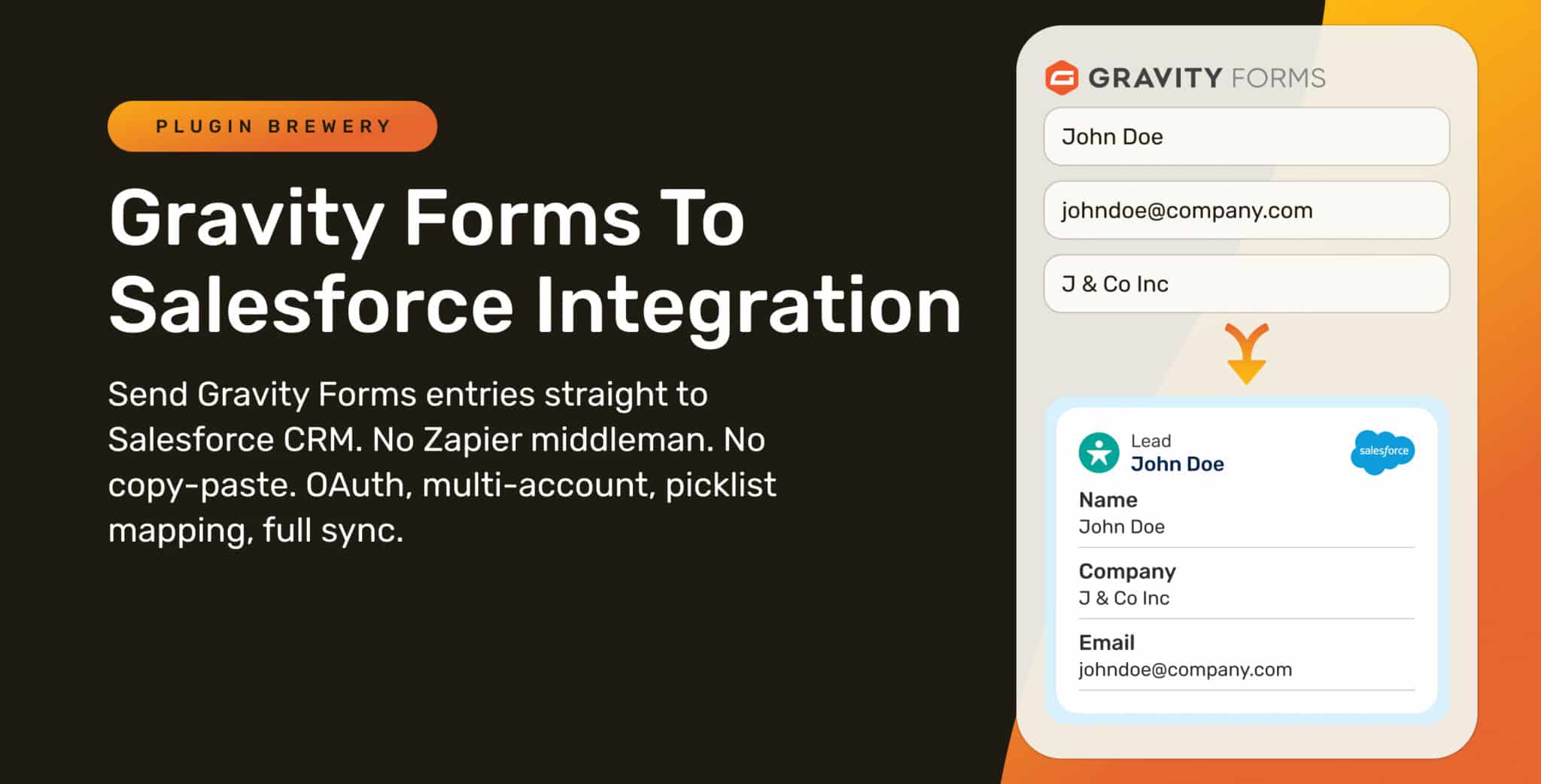
Picture this: a customer fills out your Gravity Form. They become a Lead in Salesforce. Two weeks later they edit their entry to update their phone number, but the Salesforce record stays stale. A month after that they fill out the form again, and now you’ve got two Lead records for the same person, in two different states of completeness. Your sales team is confused, your data is dirty, and you’re paying Zapier $30/month for the privilege.
If you’ve ever tried to wire Gravity Forms into a real Salesforce workflow, you know how rough the existing options are.
It sends form entries into Salesforce as Leads, Contacts, custom objects, or anything else in your org. Picklists pull live from Salesforce so dropdowns always match. File uploads attach to the record. Existing Leads get matched on email or external ID instead of duplicated. And edits, deletes, and restores in Gravity Forms flow back to Salesforce automatically.
No Zapier middleman. No copy-paste. No exports.
Table of Contents
Gravity Forms to Salesforce Integration
Send Gravity Forms entries straight into Salesforce as Leads, Contacts, or custom objects. OAuth, multi-account, picklist mapping, file uploads, prefill, and full create/update/delete sync.
Ready to Map Fields to Salesforce?
Why We Built It
Honestly, there are already a handful of Salesforce plugins for Gravity Forms out there, and most of them work fine for basic use cases. So why ship another one? Because we kept hitting two specific walls. Most existing options do one of two things:
- They send a form payload to Salesforce and call it a day. No updates, no deletes, no matching against existing records. Every form submission creates a duplicate Lead.
- They support more, but the dropdowns in your Gravity Forms never match what’s configured in Salesforce. Country picklists drift. Status options change in Salesforce and the form doesn’t follow. Your team ends up cleaning up data weeks later.
Both leave you reaching for Zapier, losing visibility into the sync, and explaining to your team why the form data doesn’t quite match Salesforce.
So we built the version we always wanted. One that handles modern OAuth, supports multiple Salesforce accounts on one site, pulls picklists live from your org, attaches files as ContentVersion records, mirrors edits and deletes both ways, and logs every sync attempt so you can prove what happened.
What You Get
A quick scan of what’s in the box:
- OAuth 2.0 with PKCE – modern auth, no static keys, no secrets in
wp-config - Multiple Salesforce accounts per WordPress site (sandbox + production, agency client orgs, parent + subsidiary)
- Field mapping for any standard or custom Salesforce object
- Live-Sync picklist mapping – pull dropdown choices directly from Salesforce
- Primary-key matching – update existing records, no duplicates
- File uploads attached to the record as ContentVersion / ContentDocumentLink
- Salesforce Notes on every entry, with merge-tag support
- Campaign membership in one click
- Owner assignment + assignment-rule control per feed
- Prefill from Salesforce with HMAC-signed URLs for renewals & self-service flows
- Full lifecycle sync – edit, trash, restore, delete all mirrored to Salesforce
- Per-entry sync sidebar with a Re-send button when something needs another shot
- Salesforce Logs page with CSV export
- Email alerts on sync failure
- Payment add-on aware – defer sync until Stripe / PayPal confirms
- Conditional logic, merge tags, multisite, developer filter – the works
Read about the full feature list in detail
Flagship Feature: Field Mapping
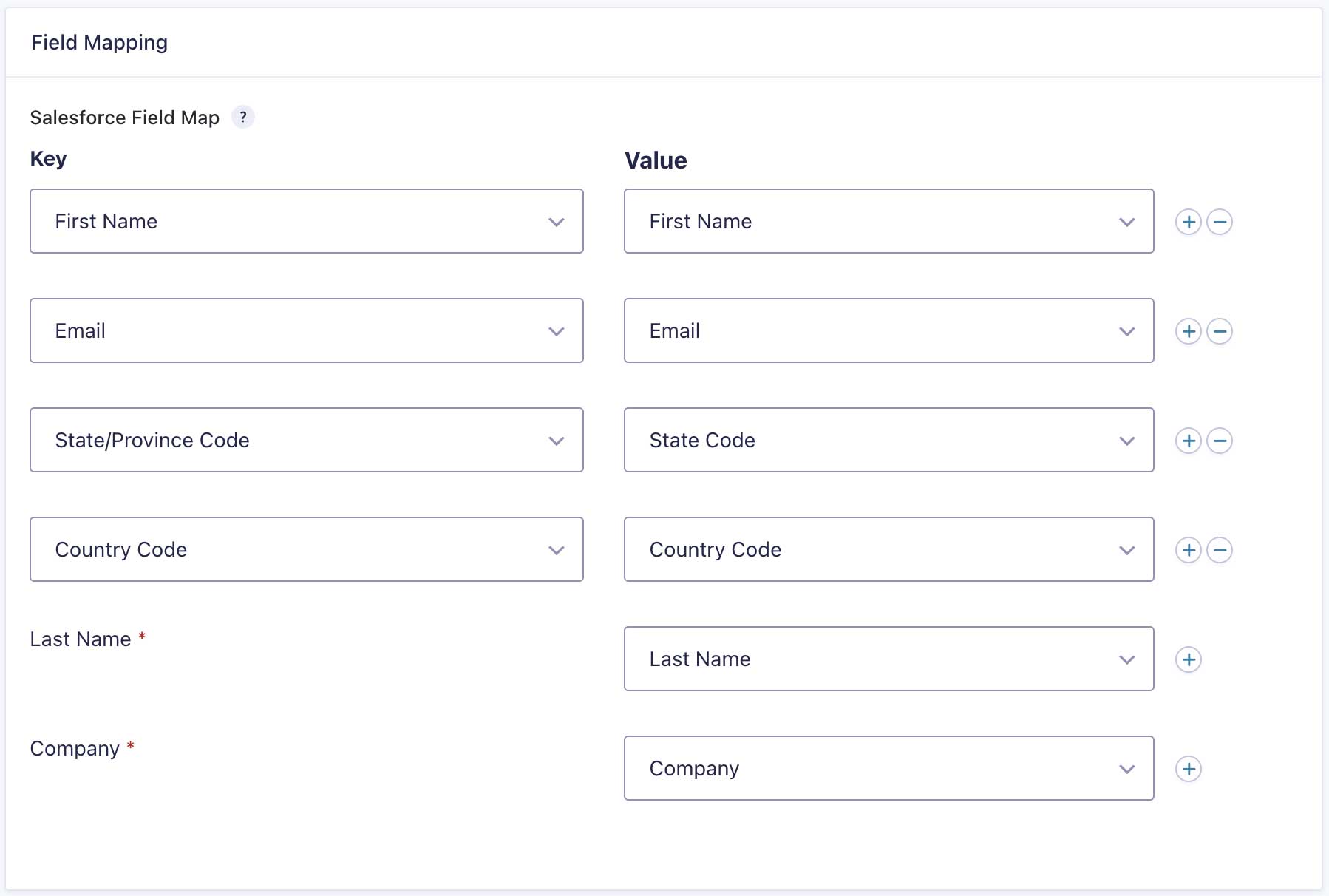
This is the foundation of the whole plugin. Map any Gravity Forms field to any Salesforce field on any object: Lead, Contact, Account, Opportunity, or any custom object ending in __c.
The plugin pulls field metadata directly from Salesforce, so the field dropdown shows your real Salesforce field labels and API names. No typing field names from memory. No copy-pasting from a Salesforce admin tab.
A few details that make the day-to-day mapping experience easier:
- Required Salesforce fields are flagged with an asterisk so you can’t miss them.
- Field types are matched automatically. Date fields go to date fields, email to email, picklists to dropdowns.
- You can map a static value, a Gravity Forms field, or a merge tag (useful for OwnerId routing or LeadSource stamping).
- Custom objects work the same way standard objects do. Pick the object, map the fields, save the feed.
Once a field is mapped, it stays mapped. Edit a Salesforce field’s API name? Re-pick it from the dropdown. Add a new field to your form? Add a new mapping row. The mapping screen is where you’ll spend most of your setup time, and we put a lot of work into making it feel solid.
Flagship Feature: Live-Sync Picklist Mapping
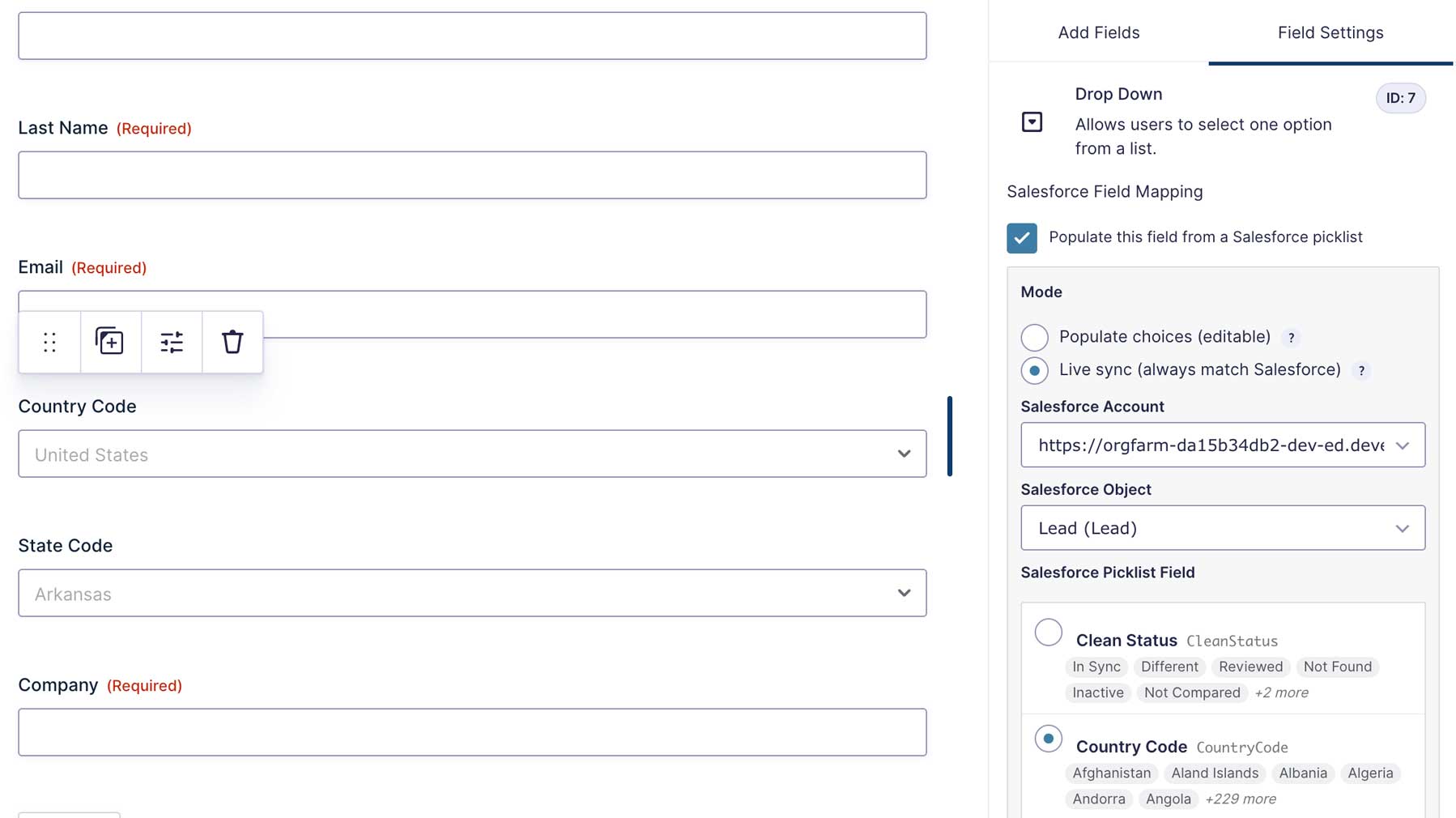
This is the one we kept coming back to during development. In our experience, it’s the feature that makes the biggest day-to-day difference for Salesforce admins.
In most form-to-CRM plugins, when you have a Country picklist or a Lead Status picklist on a form, you end up typing the choices into Gravity Forms by hand and hoping they stay in sync with Salesforce. They don’t.
This plugin pulls picklist values directly from your Salesforce org into your form’s dropdowns, multi-selects, radios, and checkboxes. Two modes per field:
- Populate copies the picklist values into the field once. You can edit, prune, or rearrange them afterwards.
- Live Sync refreshes the choices on every form render. The Gravity Forms editor locks the choices to prevent drift, so your form always matches Salesforce.
State and Country picklists get special treatment too. The plugin shows the picklist’s friendly label to the form user (so they see “California”) but submits the underlying picklist value to Salesforce (so the entry sends CA). No translation table. No mapping spreadsheet.
Flagship Feature: Multi-Account Support
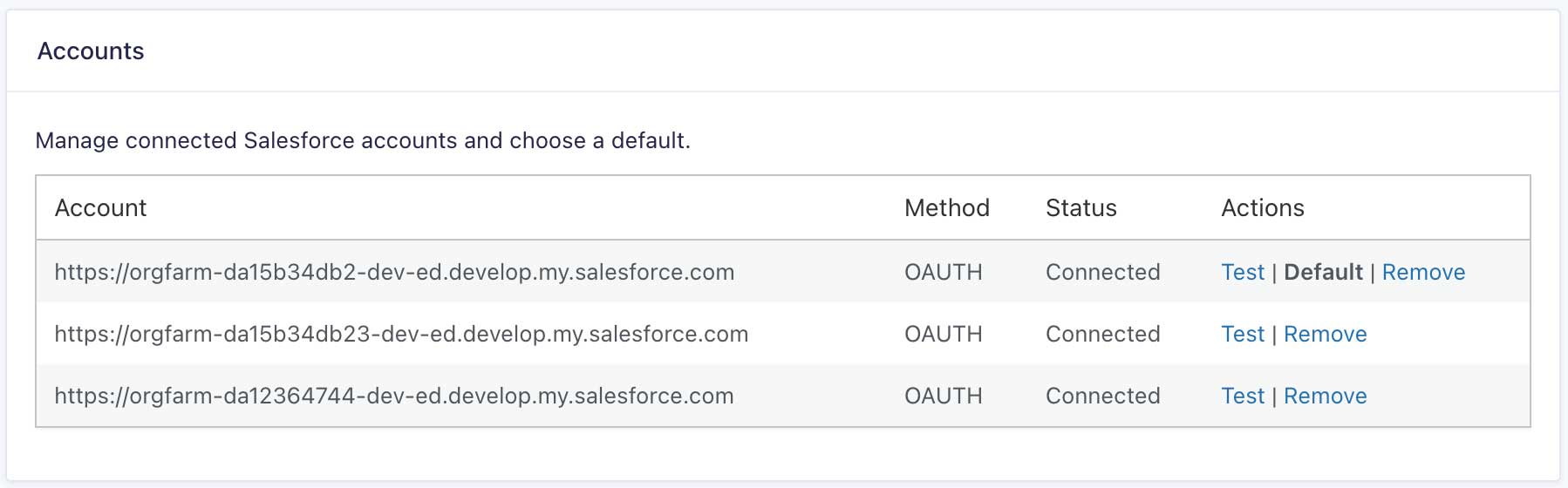
Most agencies and multi-org businesses have at least two Salesforce orgs to deal with. This plugin lets you connect all of them to one WordPress site:
- Sandbox + production at the same time
- One WordPress site managing form submissions for multiple client orgs
- Parent + subsidiary structures with different orgs per business unit
Each Gravity Forms feed picks which account it syncs to. One account is auto-selected as the default so simple setups don’t have to think about it. And every entry’s sidebar tells you which account handled the sync, so there’s no guessing about where the record landed.
Flagship Feature: Full Lifecycle Sync
Most form-to-CRM plugins are one-way. Submit a form, push a record, done. Edit that entry in Gravity Forms later? The Salesforce record falls behind. Delete the entry? The record sits in Salesforce indefinitely.
This plugin mirrors the full lifecycle:
- Edit an entry → the Salesforce record updates automatically
- Trash an entry → the Salesforce record stays put, since trashing in WordPress is reversible
- Restore from trash → sync resumes; if the Salesforce record was manually deleted while the entry was in trash, a fresh replacement is created
- Permanently delete → the Salesforce record is removed (when you’ve enabled that option in plugin settings)
The behavior follows WordPress’s native model, so your team doesn’t have to learn special rules.
Modern OAuth, Always Logged In
Connection security is one of those things you don’t think about until something goes wrong. The old way (storing static API keys in `wp-config`) means anyone with read access to your code has the keys to your Salesforce org. We built the plugin around modern OAuth 2.0 with PKCE so that’s never a concern.
Refresh tokens rotate automatically. As long as the Connected App in Salesforce isn’t revoked, the connection stays alive indefinitely. No manual re-authorization, no static API keys living in your code.
If your org happens to be on a Salesforce edition without API access (some Essentials and Professional editions), the plugin includes a Web-to-Lead / Web-to-Case fallback (Org ID mode) so you can still send Leads and Cases.
Prefill: The Power Feature for Renewals
Send a customer a personalized form with their Salesforce data already filled in. Useful for renewal forms, profile updates, customer portals, or anything you’d want pre-populated. The trick is a URL like ?sfid=001ABC... that pulls the right record into the form on page load.
For public forms, the plugin generates HMAC-signed URLs with a TTL so nobody can guess record IDs and pull data they shouldn’t see. The signed-link generator is built into feed settings: paste a record ID, get a secure link with an expiration date, drop it into your email campaign.
A Few More Things Worth Knowing About
Beyond the flagships, the plugin handles a long list of smaller details:
- Per-feed conditional logic (native Gravity Forms builder – route different submissions to different objects)
- Per-feed sync mode (Create or Update / Create only / Update only)
- Custom OwnerId per feed with merge-tag support
Sforce-Auto-Assign: FALSEheader toggle to bypass assignment rules- CSV export of all sync logs for audits
- Email notifications when Salesforce rejects a payload
pb_gfsf_payloadfilter for developers who want to mutate the payload with full sync context
What We Deliberately Didn’t Build
A few things we got asked about during development that we decided to skip. We figure it’s only fair to be upfront about what’s not in here:
- A visual workflow / no-code automation builder. Some Salesforce plugins try to be a Zapier replacement inside WordPress. We didn’t go that route. Salesforce Flow already does this better than we ever could, and we’d rather do one thing well than build a worse version of something that already exists.
- A Salesforce dashboard inside WordPress. You can already see your data in Salesforce. Adding a clunky reports tab inside WP didn’t seem useful when the real Salesforce UI is one tab away.
- A schema editor. We don’t let you create or modify Salesforce fields and objects from WordPress. That’s what Salesforce Setup is for, and trying to mirror it would just be a worse version of what’s already there.
- AI-powered field-mapping suggestions. We thought about it. But honestly, the field dropdown is fast enough already, and “AI-suggested mapping” felt like a feature we’d add for the press release rather than because anyone actually asked for it.
If any of those are dealbreakers for you, this probably isn’t the right plugin. Better to know that upfront than discover it after purchase.
Part of the Plugin Brewery Form Toolkit
This release joins our other Gravity Forms tools:
- Referral Source Tracking for Gravity Forms – see where every lead came from (search, ads, social, AI assistants, and more)
- Google Ads Tracking for Gravity Forms – capture GCLID and other ad click IDs for paid attribution
- Address Autocomplete for Gravity Forms – Google Places autocomplete on Address and Single Line Text fields
- MultiForm Anti-Spam Image CAPTCHA Pro – stop spam without reCAPTCHA or external services
Pair Salesforce Integration with Referral Source Tracking and your Salesforce Leads arrive with their UTM source already populated. Or run it alongside Address Autocomplete and your State and Country fields stay clean. The four tools work well together.
What’s Next
This is 1.0, but we’re not done. We’ve got a few things in the queue, though we’re holding off on firm timelines until we hear what early users actually need:
- More merge-tag context for advanced workflows
- A Field Mapping templates / sets feature for reusing mappings across forms
If you’ve got feature requests or run into anything weird, drop us a line. Early feedback shapes the roadmap.
Try it on Your Next Lead Form
If you’ve been gluing Gravity Forms and Salesforce together with Zapier, custom code, or one of the older form-to-CRM plugins, this is worth a look. We built it for the specific frustrations we kept hitting in client work, and we think it’ll save you some headaches too.
Get Gravity Forms to Salesforce Integration
Salesforce is a registered trademark of Salesforce, Inc. This product is not affiliated with or endorsed by Salesforce.